Dashboard > Full App Embed
Embed Draxlr's dashboards, query editor and AI assistant inside your product
Full App Embed puts a complete analytics workspace inside your product. Your customers get shared dashboards you build for them, plus their own dashboards, a query builder, a SQL editor and the AI assistant, all without leaving your app.
Use it when a single embedded dashboard isn't enough and you want your customers to explore data themselves.
Single dashboard or full app?:
To show one dashboard, use Embed Dashboard. Full App Embed is for giving each customer their own workspace with self-serve analytics.
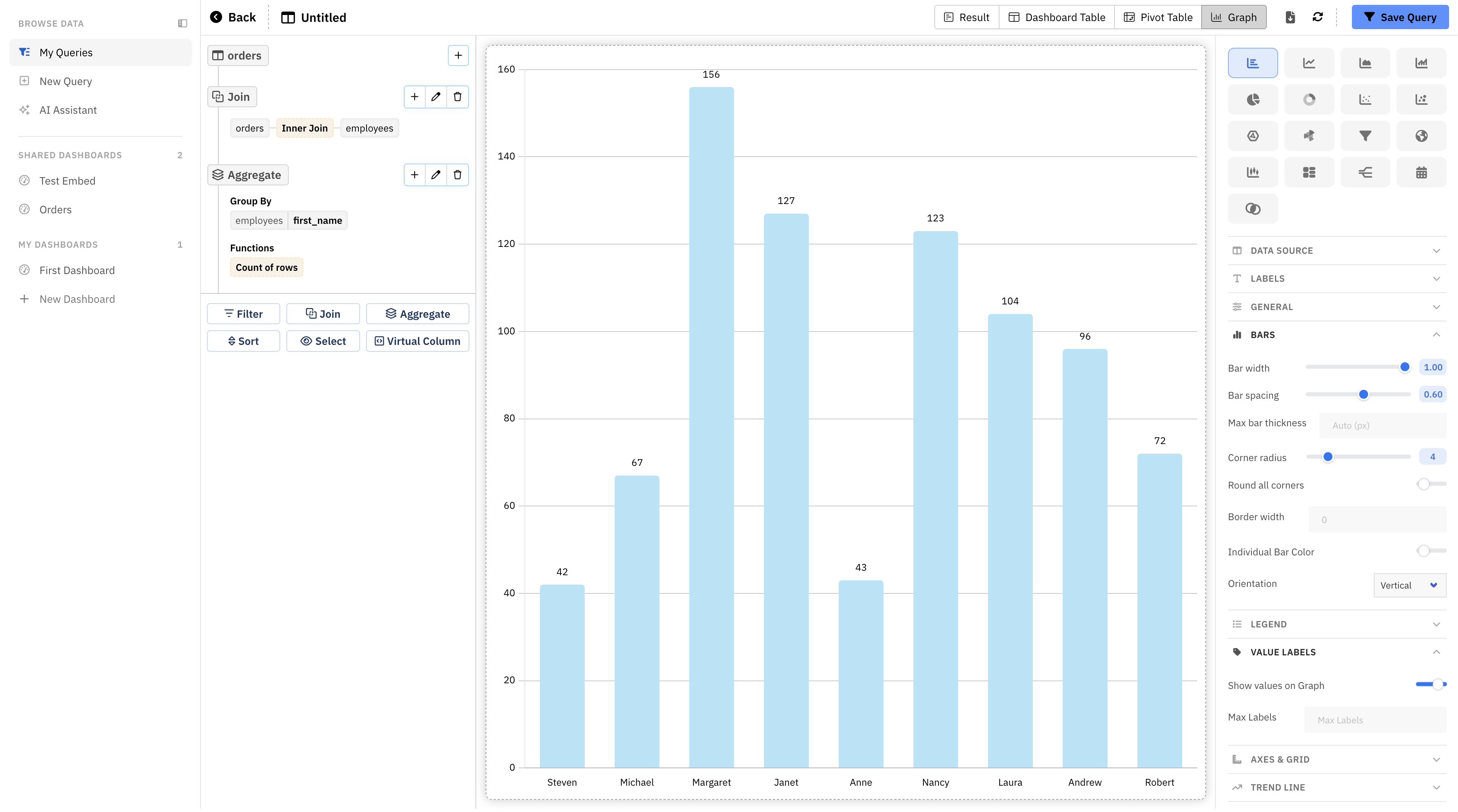
What your customers get
The embed opens with a sidebar that has three sections:
- Browse Data
- My Queries: the customer's saved queries, organized in folders.
- New Query: build a query with the Query Builder (no SQL) or write one in the SQL Editor.
- AI Assistant: ask questions in plain English and get tables and charts.
- Shared Dashboards: the dashboards you choose to share. Every customer sees the same dashboards, filtered to their own data when you use row-level security.
- My Dashboards: dashboards the customer builds themselves. They can add elements from their saved queries, add filters, and drag to rearrange and resize. New customers start with an empty dashboard called First Dashboard.
Customers can drill down, view data, change chart types and export (if you allow exports). The query editor gives them the same result views as Draxlr: Result, Dashboard Table, Pivot Table and Graph.
You choose which of these are available. For example, you can offer only the AI assistant, or turn off creating dashboards. See Permissions.
How it works
Configure the embed in Draxlr
Open any dashboard, click Embed, then choose Full App Embed. The embed builder shows a live preview and generates the code for you.
Generate a token on your backend
When a signed-in user opens the page, your server calls the Generate Token API with your API key and secret, the user's ID and your settings. Draxlr returns a token that's valid for 24 hours.
Render the embed in your frontend
Add the snippet to your page and pass it the token. The embed loads in an iframe.
<div
  class="draxlr-embed"
  data-token="TOKEN_FROM_YOUR_BACKEND"
  data-height="1000px"
></div>
<script src="https://app.draxlr.com/embed-full-app.js"></script>
Keep your API secret on the server:
Always generate the token on your backend. Your API secret must never be sent to the browser.
Each customer gets their own workspace
Pass your own user ID as userIdentifier when you generate a token. Draxlr creates a separate workspace for each ID, with its own saved queries, folders and dashboards. The same ID always returns to the same workspace.
The embed only shows the database you choose, the dashboards you share and the customer's own saved work. It doesn't show your Draxlr account, your team's saved queries or other customers' workspaces.
Plans and preview
Full App Embed is available on plans that include Full App Embedding.
If your plan doesn't include it, you can still open the builder and preview the full app embed with your own data:
- Previews use one sample user per database, so anything created in a preview is shared by everyone previewing that database.
- Preview tokens last 30 minutes.
- The embed code isn't shown. Upgrade your plan to use the embed in your product.
Things to know
- Desktop only for now: below 640px wide, the embed shows a message asking to use a larger screen. Mobile support is coming soon.
- AI credits: questions asked in the AI assistant use your organization's AI credits.
- Plan limits: queries, dashboard elements and filters created by your customers count toward your plan's limits.
- Who can set it up: members with Admin or Full access can open the embed builder.