Full App Embed > Row-level Security
Show each embedded customer only their own data
If your database holds data for many customers, use row-level security (RLS) so each customer sees only their own rows in the embed.
Without RLS, customers see the whole database:
If you don't pass an rlsGroup, the embedded user has full access to the database you embed, across every table and row. For customer-facing embeds, always use an RLS group.
How it works
RLS in the embed uses the same Permissions and Groups as RLS for team members:
- A permission decides which tables are available and adds row filters, such as
account_id = {accountId}. - A group attaches the permission.
- Each embed token names the group (
rlsGroup) and sends that customer's attribute values, such asaccountId: 42.
Draxlr applies the group's rules with the token's attribute values to everything the customer does in the embed:
- shared dashboards and their filters, drill-downs and exports;
- their own dashboards and saved queries;
- the query builder and the SQL editor;
- the AI assistant.
Tables the permission doesn't allow aren't available. Queries that use them return a permission error.
Set it up
Create a permission and a group
Follow RLS: Create a Permission to choose the tables and add row filters that use an attribute, such as account_id equals the accountId attribute. Then create an RLS group that uses this permission.
Pick the group in the embed builder
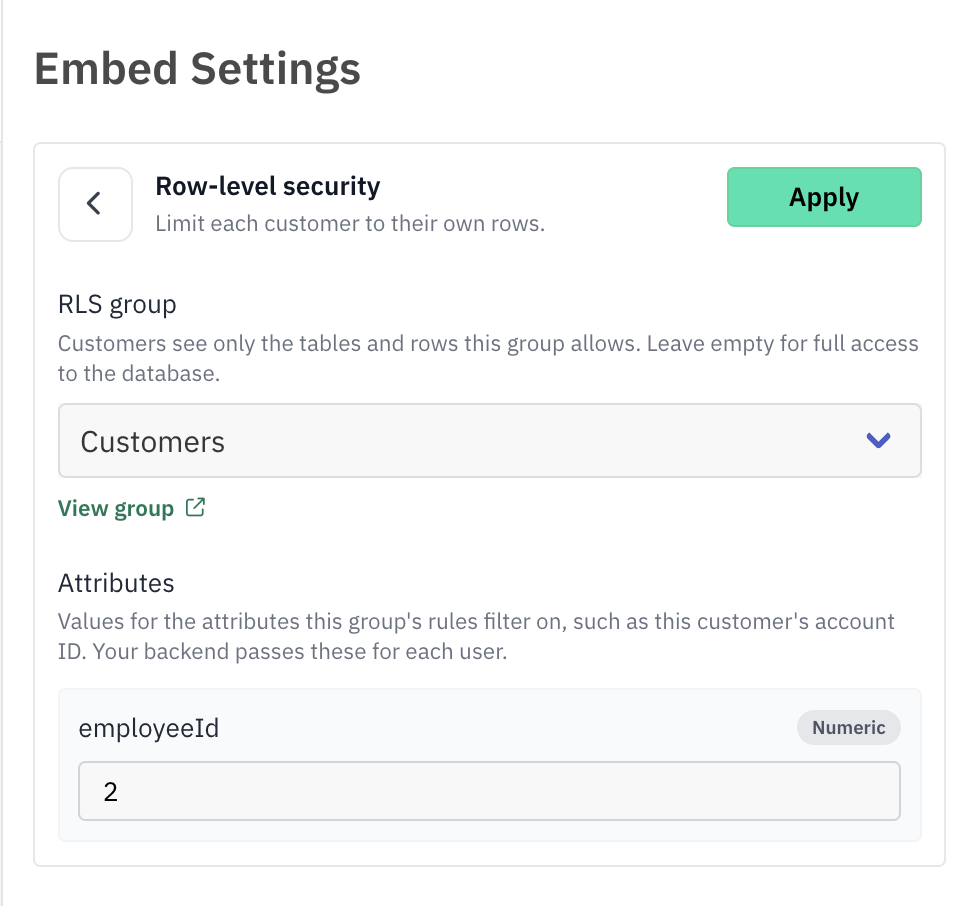
In the embed builder, open Row-level security and select the group. The builder lists the attributes the group's rules use. Enter values to preview the embed as a specific customer, then click Apply.
Send the group and attributes from your backend
When you generate a token, pass the group name as rlsGroup and the signed-in customer's values in attributes.
{
  "userIdentifier": "user_1234",
  "rlsGroup": "Customers",
  "attributes": { "accountId": 42 }
}
Attribute values
- Values in the token take priority over values set on the group for the same attribute. Attributes you don't send fall back to the group's values.
- Send values that match the rule: a number for numeric columns, and a list (such as
[1, 2, 3]) for "is one of" rules. - RLS settings travel in each token. Two tokens for the same user can use different groups or attribute values, and each keeps its own until it expires. The user's saved queries and dashboards are the same across tokens.
Good practices
- Always use RLS for customer-facing embeds. Leave it out only for internal users who should see everything.
- Set allowed domains. Restrict where the embed can load with Allowed domains.
- Generate tokens per visit. Tokens last 24 hours and can't be revoked one by one. When a customer loses access, stop issuing tokens for them; an existing token keeps working until it expires.
- Change groups carefully. Before you delete or rename an RLS group used by the embed, update your backend to stop sending it. Existing tokens keep referring to it for up to 24 hours.
Computed card trends aren't per customer:
The trend on a computed card (for example "▲ 4.2% since yesterday") is calculated from all rows, not per customer. Turn off Show Trend on computed cards in dashboards you share with RLS customers.