Query Builder > Filter
Learn how to filter SQL data in Draxlr's Query Builder, combine conditions with AND or OR, and use operators for text, number, date, time, and datetime columns.
You can filter your data based on the field's data type.
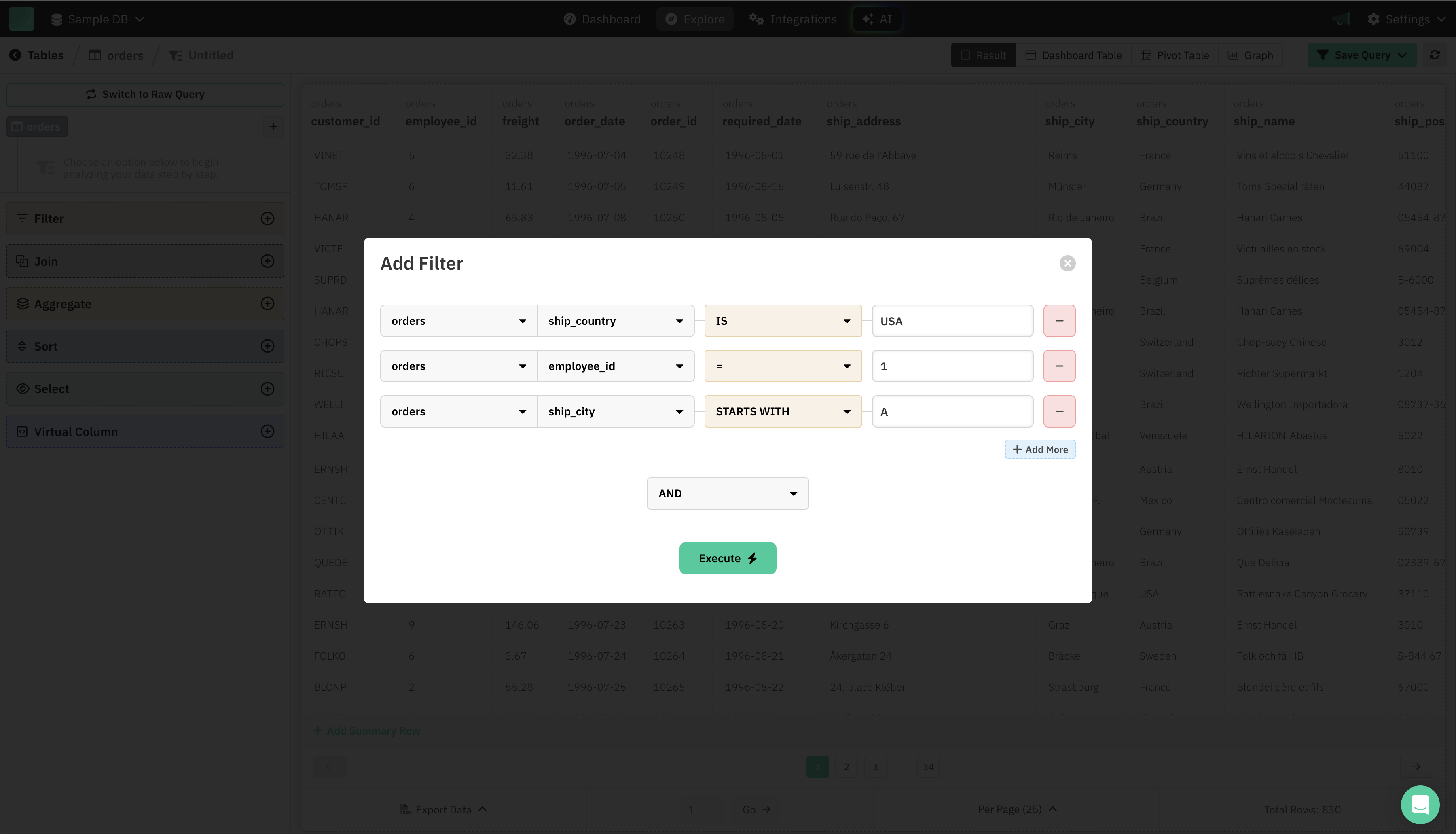
How to Use the Filter Feature
-
Open the Filter Modal
- Click on Filter in the left sidebar.
- The "Add Filter" dialog will open, letting you build your filter conditions.
-
Add Filter Conditions
- For each filter, choose:
- Table: Select the relevant table (e.g.,
orders). - Column: Choose the field you want to filter (e.g.,
ship_country,employee_id,ship_city). - Operation: Pick a filter operation—these will change depending on the column's data type. All the operations based on data types is mentioned below.
- Value: Enter the value to filter by (e.g.,
USA,1,A).
- Table: Select the relevant table (e.g.,
- Click + Add More to add additional filter conditions.
- Remove any filter with the – button.
- For each filter, choose:
-
Combine Conditions
- Choose how to combine multiple filters—AND (all conditions must match) or OR (any condition can match).
-
Execute the Filter
- Once your filters are ready, click Execute.
- Your table will update to show only rows matching your criteria.
Data Types
String & Text
Operators:
- like: Checks if the value matches a pattern (using
%as a wildcard). - not_like: Checks if the value does not match a pattern.
- is: Checks if the value exactly matches the given string or text.
- not: Checks if the value does not match the given string or text.
- starts_with: Checks if the value starts with the given substring.
- ends_with: Checks if the value ends with the given substring.
- null: Checks if the value is NULL.
- not_null: Checks if the value is NOT NULL.
- present: Checks if the value is present (not NULL and not empty).
- blank: Checks if the value is empty or NULL.
- in: Checks if the value exists in a provided list.
- not_in: Checks if the value does not exist in a provided list.
- contains: Checks if the value contains the given substring.
Number (Integer, Decimal, Float)
Operators:
- =: Checks if the value is equal to the given number.
- !=: Checks if the value is not equal to the given number.
- >: Checks if the value is greater than the given number.
- >=: Checks if the value is greater than or equal to the given number.
- <: Checks if the value is less than the given number.
- <=: Checks if the value is less than or equal to the given number.
- null: Checks if the value is NULL.
- not_null: Checks if the value is NOT NULL.
- in: Checks if the value exists in a provided list.
- not_in: Checks if the value does not exist in a provided list.
Date
Operators:
- on: Checks if the value is on the specified date.
- not: Checks if the value is not on the specified date.
- after: Checks if the value is after the specified date.
- before: Checks if the value is before the specified date.
- after_relative: Checks if the value is after a relative interval (e.g., days ago).
- before_relative: Checks if the value is before a relative interval.
- today: Checks if the value is today.
- yesterday: Checks if the value is yesterday.
- this_week: Checks if the value is within this week.
- last_week: Checks if the value is within last week.
- this_month: Checks if the value is within this month.
- last_month: Checks if the value is within last month.
- this_year: Checks if the value is within this year.
- in_year: Checks if the value is within the specified year.
- in_quarter: Checks if the value is within the specified quarter.
- in_month: Checks if the value is within the specified month.
- in_month_name: Checks if the value is within the specified month (by name).
- in_week: Checks if the value is within the specified week.
- on_date: Checks if the value is on the specified date.
- on_day: Checks if the value is on the specified day.
- between: Checks if the value falls between two dates.
- null: Checks if the value is NULL.
- not_null: Checks if the value is NOT NULL.
Time
Operators:
- after: Checks if the value is after the specified time.
- before: Checks if the value is before the specified time.
- on: Checks if the value is at the specified time.
- not: Checks if the value is not at the specified time.
- in_hour: Checks if the value is within the specified hour.
- in_minute: Checks if the value is within the specified minute.
- in_second: Checks if the value is within the specified second.
- null: Checks if the value is NULL.
- not_null: Checks if the value is NOT NULL.
DateTime
Operators:
- after: Checks if the value is after the specified date and time.
- before: Checks if the value is before the specified date and time.
- after_relative: Checks if the value is after a relative interval (e.g., minutes ago).
- before_relative: Checks if the value is before a relative interval.
- on: Checks if the value is on the specified date and time.
- not: Checks if the value is not on the specified date and time.
- today: Checks if the value is today.
- yesterday: Checks if the value is yesterday.
- this_week: Checks if the value is within this week.
- last_week: Checks if the value is within last week.
- this_month: Checks if the value is within this month.
- last_month: Checks if the value is within last month.
- this_year: Checks if the value is within this year.
- in_year: Checks if the value is within the specified year.
- in_quarter: Checks if the value is within the specified quarter.
- in_month: Checks if the value is within the specified month.
- in_month_name: Checks if the value is within the specified month (by name).
- in_week: Checks if the value is within the specified week.
- on_date: Checks if the value is on the specified date.
- on_day: Checks if the value is on the specified day.
- in_hour: Checks if the value is within the specified hour.
- in_minute: Checks if the value is within the specified minute.
- in_second: Checks if the value is within the specified second.
- between: Checks if the value falls between two date-time values.
- null: Checks if the value is NULL.
- not_null: Checks if the value is NOT NULL.
Year
Operators:
- on: Checks if the value matches the specified year.
- after: Checks if the value is after the specified year.
- before: Checks if the value is before the specified year.
- after_relative: Checks if the value is after a relative year interval.
- before_relative: Checks if the value is before a relative year interval.
- not: Checks if the value does not match the specified year.
- null: Checks if the value is NULL.
- not_null: Checks if the value is NOT NULL.
Boolean
Operators:
- is_true: Checks if the value is true.
- is_false: Checks if the value is false.
- null: Checks if the value is NULL.
- not_null: Checks if the value is NOT NULL.
JSON
Operators:
- key_exists: Checks if the specified key exists in the JSON.
- key_null: Checks if the specified key is NULL in the JSON.
- contains: Checks if the JSON contains a specified key-value pair.
- null: Checks if the value is NULL.
- not_null: Checks if the value is NOT NULL.
Array
Operators (Strings/Integers):
- contains: Checks if the array contains the specified value.
- empty: Checks if the array is empty.
- null: Checks if the array is NULL.
- not_null: Checks if the array is NOT NULL.
UUID
Operators:
- is: Checks if the value matches the specified UUID.
- null: Checks if the value is NULL.
- not_null: Checks if the value is NOT NULL.